Convert CSV / TSV to Publication-Ready LaTeX booktabs & siunitx Tables
Hand-formatting NeurIPS, ICML, ICLR, IEEE, or ACL ablation tables from experiment CSVs leads to misaligned decimals, broken bold tags inside siunitx S-columns, and tedious re-ranking whenever a new seed finishes.
Why Researchers & Engineers Use TableForge
- Generates clean \toprule / \midrule / \bottomrule markup with zero vertical lines.
- Auto-detects numeric columns, higher-is-better vs lower-is-better directions, and wraps #1 in \textbf{} and #2 in \underline{}.
- Parses mean ± std strings cleanly and computes Δ against your chosen baseline row.
- Runs 100% client-side in browser memory — unpublished experiment metrics never touch a server.
Example Output (NeurIPS / ICML booktabs)
\begin{table}[t]
  \centering
  \caption{Benchmark comparison (mean $\pm$ std over 5 seeds).}
  \begin{tabular}{lccc}
    \toprule
    Method & Acc. (\%) $\uparrow$ & F1 (\%) $\uparrow$ & Latency (ms) $\downarrow$ \\
    \midrule
    Baseline A & 81.4 $\pm$ 0.4 & 79.8 $\pm$ 0.5 & \underline{14.2} \\
    Baseline B & \underline{84.1 $\pm$ 0.3} & \underline{82.6 $\pm$ 0.4} & 21.8 \\
    \textbf{Ours} & \textbf{87.3 $\pm$ 0.2} & \textbf{86.1 $\pm$ 0.3} & \textbf{12.9} \\
    \bottomrule
  \end{tabular}
\end{table}
Visual Walkthrough
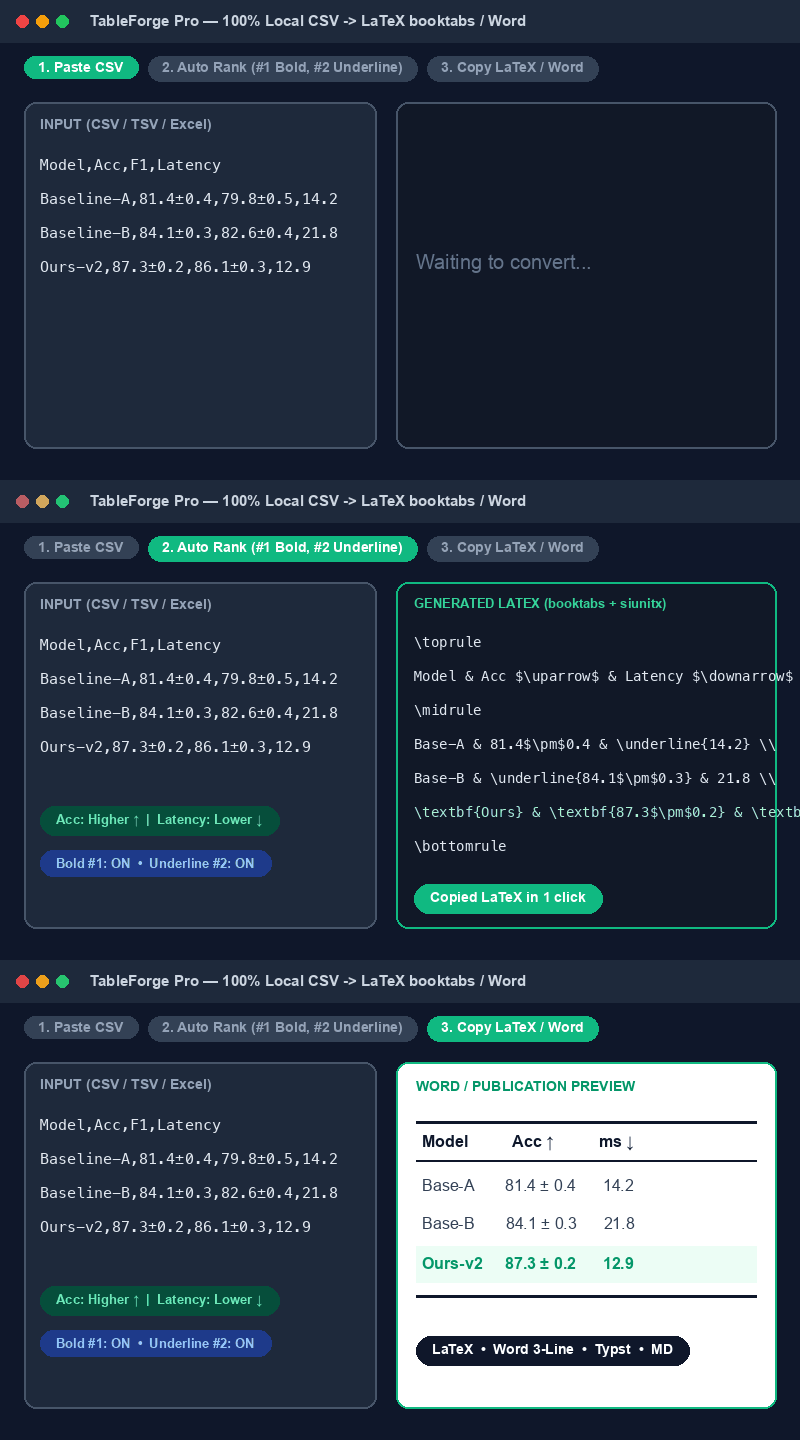
Want offline Chrome Side Panel access, batch ZIP exports, or zero-dependency Python CLIs? Use starter code STARTER20 for 20% off any one-time Pro pack or the 6-tool bundle.
Frequently Asked Questions
Does this CSV to LaTeX converter upload my research data?
No. All CSV parsing, column ranking, and booktabs generation run strictly inside your browser with zero backend uploads.
How does it handle siunitx S-columns with bold numbers?
TableForge emits \sisetup{detect-weight=true} compatible markup so bold best values and underlined second-best values stay aligned on the decimal point.
Can I paste directly from Excel or Google Sheets?
Yes. Copy any cell range from Excel, Sheets, or Pandas .to_csv() and paste it straight into the input box.
What does the optional one-time Pro pack add?
TableForge Pro ($15 one-time, no subscription) adds the offline Chrome Side Panel, multi-table batch ZIP export, and a zero-dependency Python CLI for CI/scripted paper pipelines.